WordPress Business Website
Build a complete 5 to 7 page business website, from brief to launch.
- WordPress setup
- Theme and page builder
- Responsive design
- Lead forms and WhatsApp buttons

Pick one project. Learn what it needs through short recorded lessons, build it yourself, and get every milestone reviewed by a mentor in Live Project Reviews. 15 to 30 days, fully online.
Example: day 5 of the business website track
Approved Next milestone: About, Services and Contact pages
One student. One project. One finished outcome.
You do not watch 50 hours of videos and build something at the end. Every lesson is followed by a task on your own project, so your project grows every day.
A short recorded lesson, 10 to 25 minutes, on exactly what today needs.
Do the task on your own project, usually 1 to 2 hours.
Send your project link or screenshot, and where you got stuck.
In the live session, a mentor looks at your work on screen share.
Your milestone is approved, or you get clear fixes to make first.
Every track starts from the same WordPress and SEO foundations, then follows your project. The lessons are arranged around what you are building, not as a long list of topics.
Build a complete 5 to 7 page business website, from brief to launch.
Build a personal or freelancer portfolio that wins work.
Build a content website with categories, articles and content SEO.
Build high-converting landing pages for ads, with tracking.
Build a local business website and make it visible on Google and Maps.
Build a website where customers book appointments and pay online.
Build a listing website, such as properties or local businesses, with search and filters.
Build a website that sells online courses or memberships.
Build a working WooCommerce online store with products, checkout, shipping and SEO.
Build a Shopify store with products, checkout and store SEO.
Take one real website from audit to a before-and-after SEO report.
Set up and optimise a Google Business Profile so a business shows on Maps.
Plan, set up and report a lead generation campaign on Facebook and Instagram.
Run a month of Instagram and Facebook content for a real business.
Automate follow-ups so no lead is missed: WhatsApp and email.
Lessons are recorded, so you study when it suits you: before college, after work or late at night. The live reviews keep you on track. Exact days and times are shared with your batch.
Live online session, 60 to 75 minutes, recorded Recorded lessons and your task, about 2 hours
| A typical video course | AMJAM project training | |
|---|---|---|
| What you buy | Hours of videos | A finished project, with a mentor |
| How lessons are arranged | Topic by topic, project at the end | Around your project, step by step |
| Live sessions | General doubt sessions | Your work reviewed on screen share |
| Feedback on your work | Rarely | Every milestone: approved or fix this |
| SEO | A separate course | Built into your project |
| Certificate | For watching the videos | Only when your project is approved and presented |
| What you can show afterwards | A certificate | A live project, case study, SEO report and certificate |
A website that nobody finds is not finished. So every website track teaches the SEO its project needs, on the project itself. Marketing tracks teach measurement instead: tracking every lead and reading the numbers.
| If you build a | You learn |
|---|---|
| Business website | Service-page SEO |
| E-commerce website | Product and category SEO |
| Local business website | Local SEO and Google visibility |
| Blog website | Content and keyword SEO |
| Meta ads or social media project | Tracking, cost per lead and reporting |
Three times a week, 60 to 75 minutes, online. You share your screen, the mentor inspects your website, explains what is wrong and why, and sets your next milestone. Missed one? Watch the recording and send your questions.
Your mentor will not fix your website for you. You learn by making the fix yourself.
Not startedSubmittedRevision neededApproved
A complete website, SEO or marketing project you built yourself and can show to colleges, employers or clients.
The problem, your solution, tools, screenshots and results, written up for your portfolio.
Website and SEO tracks end with an SEO report; marketing tracks end with a results report with real numbers.
An industrial training certificate from AMJAM Solutions once your project is approved and presented.
A ready structure for students: objective, technology, requirements, screenshots, testing, results, conclusion and future scope.
A lesson on quoting, scope, advance payment, revisions and handover, so you can take client work.
Use AI to draft sitemaps, page content, FAQs, product descriptions and meta descriptions, and to group keywords. Then check and rewrite every line yourself: AI drafts, you decide.
How to take a brief, write a quotation and scope, ask for an advance, limit revisions and hand over the finished work. The 30-day tracks include a mock client briefing.
A milestone checklist from day 1, a reminder on WhatsApp when a new milestone opens, and a review three times a week, so you finish instead of stopping halfway.
Writing the industrial training report is often harder than the training. You get a ready template with every chapter colleges usually ask for. You fill it with your own project, screenshots and results, and your mentor checks it before you submit.
Check your college’s own format too: we help you adjust the template to it.
Watching videos does not earn the certificate. You get it when at least 80% of your milestones are approved and you present your project on the final live call.
The certificate says you completed project-based industrial training with AMJAM Solutions. It is not an internship or job offer, and we never claim it is.
Every certificate has a unique number and a QR code. Colleges and employers can check it is genuine on our certificate verification page.
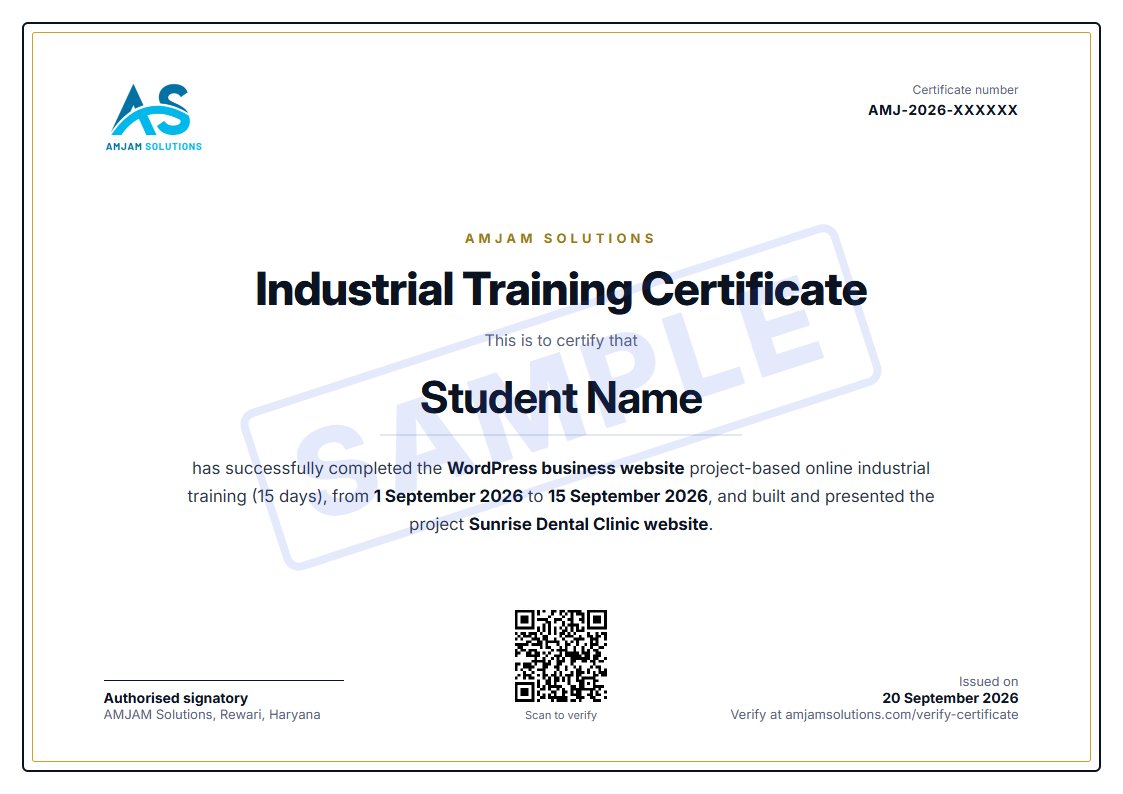
No exams and no marks. Your mentor reviews the finished project with you and tells you exactly what is good and what to improve.
BCA, MCA, B.Tech, B.Sc IT and diploma students who need industrial training with a real project and a report they can submit.
Add a complete, working project to your portfolio and explain every decision you made in it.
Learn to take a client website from requirement to launch, including the quote and the handover.
Build and manage your own business website or store instead of depending on someone else for every change.
Up to 45 minutes on Google Meet with screen share. Fix an error, set up a plugin or WooCommerce, or get your website reviewed.
We call or WhatsApp you within one working day with the batch date, the fee and what you need before day 1.
We will call or WhatsApp you within one working day with the next batch date, the fee and what you need before day 1.
Want a head start? Join one of our free live workshops.
Join our WhatsApp channel for batch updatesHi there. Want a free review of your marketing? Send us a message and a strategist will reply.
Start chat on WhatsApp